Kling 3.0 Pro

Create videos from text or images with Kling 3.0 Pro, with generated audio.

What to create with Kling 3.0 Pro

Kling 3.0 brings visual action, character performance and generated sound into the same video task. AIVG uses the Pro generation variant: 5 seconds at 1080p with audio included. Compare the manufacturer’s VIDEO 3.0 demonstration with our short sound-event and starting-image tests. This page does not expose a storyboard editor, character-reference library or source-video editing controls.

Model documentation

Updated 2026-09-08 · AIVG product team

Kuaishou · Kling 3.0 Pro

On this page

Kling 3.0 Pro supports 5s clips at 1080p in 16:9; generated audio Supported; end frame Not available.

Explore what you can create with Kling 3.0 Pro

Published demonstrations and AIVG tests are labelled separately. Look at the capability each example illustrates, then inspect the inputs and try your own variation.

Explore character performance with native audio

The manufacturer’s VIDEO 3.0 example illustrates character performance and spoken dialogue. Compare who is speaking, facial movement and the soundtrack; it is a family demonstration, not an AIVG Pro test.

Manufacturer demonstration · Kling AI · 1920×1080

This VIDEO 3.0 family recording is about 10 seconds at 1080p with audio. The source does not establish the Pro tier. AIVG Pro currently offers 5 seconds; its separate team tests are shown below.

View original source

Pair a visible action with its sound

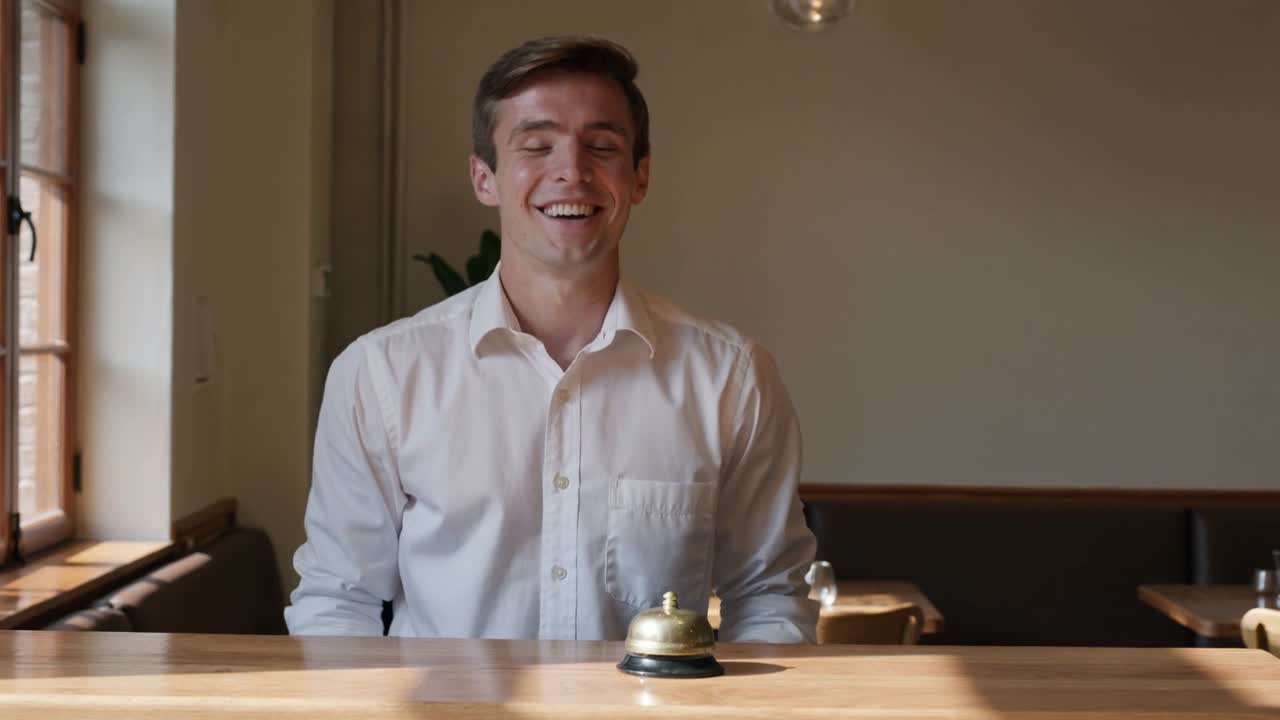
A cafe host rings a bell and says a short line. This simple sequence makes the physical action, sound event and mouth movement easy to compare.

Prompt (English)

A single continuous medium shot in a quiet sunlit cafe. One adult host stands behind a wooden reception counter beside a small brass service bell. The host gently presses the bell once with one finger; a clear single ding sounds exactly at contact. Then the host looks up, smiles naturally and says in English, "Your table is ready." Keep the face and speaking mouth clearly visible. A locked camera, realistic hands, natural warm light, quiet room ambience. No other people, no cuts, no music, no captions or logos.
Generated video

AIVG test recording · 5.041667s · 2026-09-08 · Current quote: 200 credits

Prompt, settings and recording notes

1080p · 5s · 16:9

Input: Text prompt only.

What to check: Listen for the bell at contact and compare the spoken line with the mouth. Inspect the finger, bell and face throughout; a successful render does not establish perfect synchronization.

Animate a starting photograph

Use a real composition as the first frame, then describe the movement. Compare the input and output before using the result.

Starting image
One starting photograph you own or have permission to use.

Prompt (English)

A plain cobalt blue ceramic cup rests on a pale wooden table beside a window. Soft morning light, gentle steam rising, one slow camera push-in. No people, no lettering, no logos. Keep the cup shape and tabletop stable.
Generated video

AIVG test recording · 5.041667s · 2026-09-06 · Current quote: 200 credits

Prompt, settings and recording notes

1080p · 5s · 16:9

Input: One starting photograph you own or have permission to use.

What to check: This take keeps a largely fixed composition while the steam changes. Compare the starting frame and cup details; the requested push-in is not pronounced.

How to

How to use Kling 3.0 Pro

  1. 01

    Choose your starting point

    Describe a new scene or upload one clear starting image. Keep the subject and composition simple for the first take.

  2. 02

    Direct the action

    Name the subject, one main action and one camera movement. Use the examples below as a starting point, then adapt the instructions.

  3. 03

    Check the credits and create

    Review the exact quote before submitting. Play the complete result in your creation, inspect the important details and reuse the inputs for another take.

Cost

What a generation costs

A 5-second Kling 3.0 Pro video costs 200 credits.

5s1080p · 16:9 · Generate audio: On
200credits

You always see the exact credit quote for your settings before anything is charged.

Estimate the real cost of your shot after retries

Capabilities

Supported controls

Durations
5s
Resolutions
1080p
Aspect ratios
16:9
Generated audio
Supported
End frame (image tail)
Not available
Seed
Not available
Negative prompt
Not available
Last verified
Sep 6, 2026 · Current

Example 1080p · 16:9 · audio on / 5s: 200 credits, equivalent to $3.98 USD using the 100-credit / $1.99 USD pack. Credits are purchased in packs; check the exact quote for your settings before generating.

Where it fits

  • Generate picture and sound in one take
  • Explore short character actions and spoken lines
  • Create 1080p video from text or a starting photograph

Know before you generate

  • Current Pro option: 5 seconds at 1080p with audio included. Text input uses 16:9; image input starts from one photograph.
  • Storyboards, multi-shot controls, end frames, character elements, voice IDs, seed and negative-prompt controls are not offered here. Kling O3 and Motion Control are separate capabilities.
  • Keep spoken lines short. The current generation service documents Chinese and English speech; do not assume every interface language is a supported speech language. Review hands, lip movement and sound timing.

AIVG does not provide an API, unlimited credits or watermark removal; official account matters go to Kuaishou.

Related models

Compare nearby models

ModelBaseline creditsHighest resolutionLongest durationNative audioModes
Kling 3.0 Pro200 credits · 1080p · 16:9 · audio on / 5s1080p5sSupportedText to Video / Image to Video
Kling 2.1 Master285 credits · model output · audio off / 5sdecided by the model10sNot availableText to Video / Image to Video
Kling 2.6100 credits · model output · audio off / 5sdecided by the model10sSupportedText to Video / Image to Video
Vidu Q3 Pro185 credits · 720p · 16:9 · audio on / 5s720p5sSupportedText to Video / Image to Video

See the full AI video cost table

FAQ

Can I use the generated video commercially?

Commercial use follows each model's own terms — confirm them before publishing.

Will the exported video have a watermark?

Watermark and export permissions depend on your plan and selected model.

What happens to credits when generation fails?

When a generation job reaches a failed state, the credits charged for it are returned to your balance.

When will I see the exact credit quote?

Exact quote before every run.

How much does Kling 3.0 Pro cost on AIVG?

The current 5-second 1080p option costs 200 credits for either text or image input. Generated audio is included; this option has no silent-price switch. The table above describes this configuration; your quote confirms the amount before submission.

Can I try this model with my welcome credits?

The current new-account allowance is 100 credits. Complete runs covered at this configuration: 0. Check your available balance and the free-trial guide; a paid package may be needed.

Can I edit an existing video or transfer its motion?

This page generates a new video from text or one starting image. It does not offer source-video editing or motion transfer. Open AI video editing for supported editing models.

Are these examples generated with the same settings?

Manufacturer demonstrations are attributed and may use different settings. The AIVG team recordings show their actual prompt, input and output settings. Each is an individual result, not a quality guarantee.

Is Kling 3.0 Pro the same as Kling O3 or Motion Control?

No. This page uses Kling 3.0 Pro for text-to-video and starting-image generation. O3, motion transfer and structured multi-shot features are separate options and are not enabled by choosing this model.

Start generating with Kling 3.0 Pro

Exact quote before every run.